
Overview
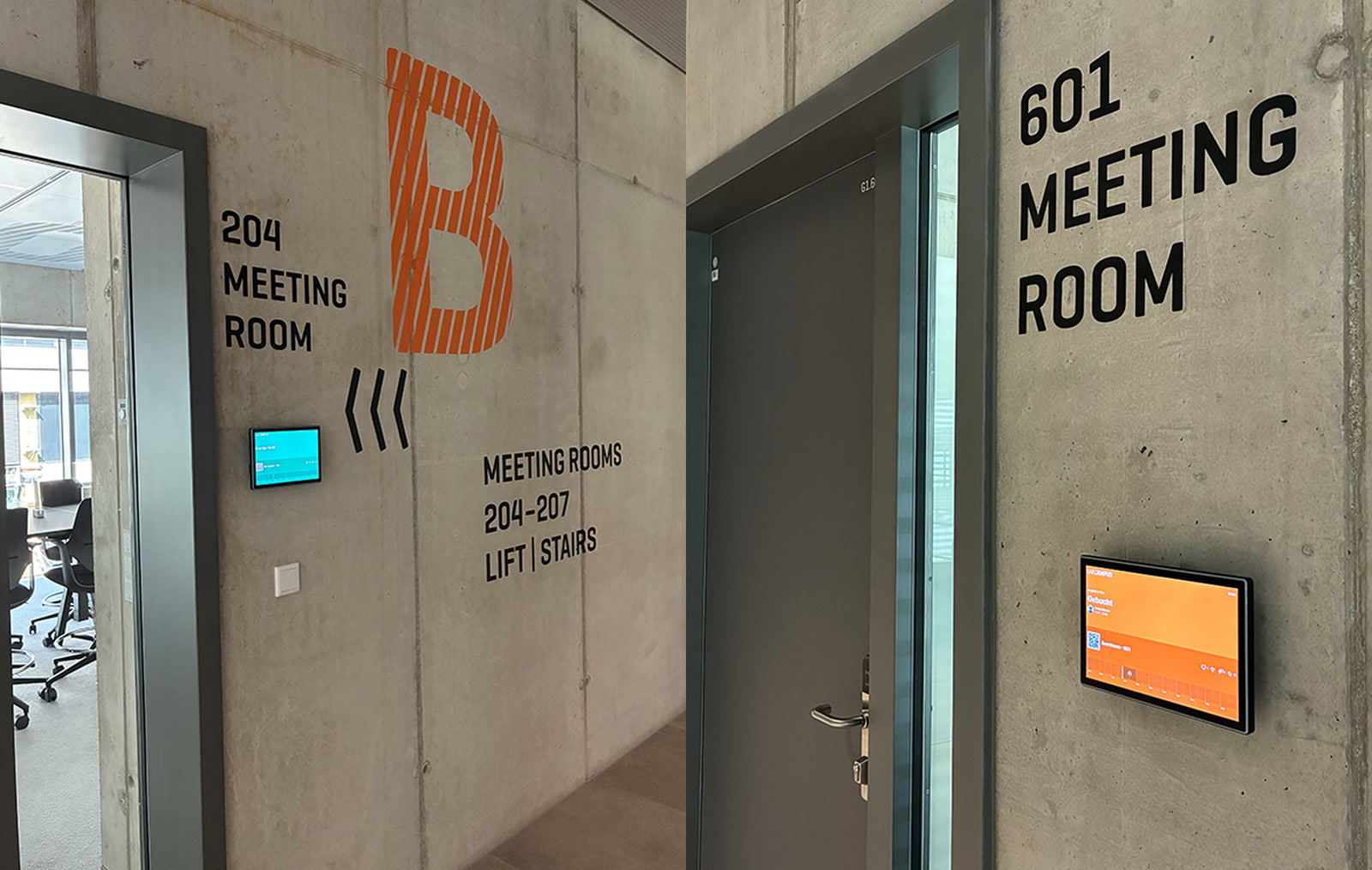
LabCampus near Munich Airport put a ProDVX room booking panel outside each of its 12 shared meeting spaces. The panels run the anny Display App. Each one shows whether the room is free and what is booked next. Anyone can book a free room at the door.
The rooms are used by several organisations at once, so no single company’s calendar tells the full story. That is a common setup in Australia too. Think co-working floors, university buildings, science parks and serviced offices.
AVD distributes ProDVX displays and panel PCs across Australia and New Zealand. Integrators here can build a similar setup for shared buildings.
About LabCampus
LabCampus is an innovation campus right next to Munich Airport in Bavaria. It brings research groups, high-tech firms, start-ups and young talent onto one site. The campus says it has room for up to 29 buildings. The first ones, including LAB48, are already open.
Bavarian newspaper Bayerische Staatszeitung reports that LabCampus is wholly owned by Flughafen München GmbH. That company runs Munich Airport.
The Challenge: Many Tenants, One Set of Rooms
LabCampus runs a central meeting area with 12 shared spaces. They range from standard meeting rooms to high-end boardrooms and creative workshop rooms. The smallest suits 2 people and the largest holds 40.
The people using them don’t all work for the same company. ProDVX lists tenants such as the Technical University of Munich, plus outside visitors and staff from the nearby airport.
- Bookings were already in one place. Every room was managed in anny’s booking platform. People could check it through the anny Display App.
- The rooms themselves showed nothing. From the corridor, nobody could quickly tell if a room was free, taken or about to be used.
LabCampus wanted room status visible at each door, while keeping booking simple for every group.
The Solution: A ProDVX Room Booking Panel at Every Door
LabCampus fitted a ProDVX room booking panel beside the door of all 12 rooms. Every panel connects to anny’s booking platform.
Each ProDVX room booking panel shows the room’s current status and its upcoming bookings. A person who needs a room right now can book it on the touchscreen. The booking goes straight into anny, so the system and the door always match.
What Was Deployed
| Component | Quantity | Job at LabCampus |
|---|---|---|
| ProDVX APPC-10SFN (R25-7281), 10.1″ Android 13 panel PC | 12, one per room | Shows room status and upcoming bookings, and takes bookings at the door |
| Full surround LED status bar | Built into each panel | Changes colour so people can read room status from down the corridor |
| Integrated NFC reader | Built into each panel | Part of the hardware spec ProDVX lists for the job |
| anny booking platform | All 12 rooms | Holds every booking for the shared meeting area |
| anny Display App | Runs on each panel | Keeps each screen in sync with anny in real time |
Why PoE+ Shaped the Hardware Choice
ProDVX says Power over Ethernet (PoE+) was a key reason LabCampus picked the APPC-10SFN. One network cable carries both power and data to each panel.
No ProDVX room booking panel needed a separate power supply at its door. According to ProDVX, this made installation much simpler and cut the cabling needed across the meeting area. In a finished building, fewer power points at the door can mean less electrical work. It can also mean fewer trades on site.
“The ability to power the displays via PoE is also a major advantage, as it meant we didn’t have to install separate power supplies.”
Fabian Häusler, Senior Marketing Manager, LabCampus
How the anny Display App Pairs With the Panels
anny’s own setup guide explains how the app gets onto a ProDVX panel. The anny Display App is installed from the app store. On first launch it shows a pairing code. An admin enters that 6-digit code under Displays in anny’s admin area. That links the ProDVX room booking panel.
From then on, bookings, cancellations and last-minute changes flow to the screen automatically. anny lists the APPC-10SFN among the ProDVX models it supports, alongside the APPC-10SFA, APPC-10SF, APPC-10S, APPC-10SLB, APPC-10SLBe and APPC-10SLBN.
Key Outcomes and Results
ProDVX’s write-up gives no figures. It describes how the meeting area works now.
The LED bar on each ProDVX room booking panel tells people if a room is free or taken. People can read it from down the corridor. Tenants and visitors spend less time hunting for a room. They see up-to-date bookings, and they can grab a free room on the spot.
ProDVX also reports that user satisfaction has noticeably improved across the different groups using the meeting area. It says live room displays have become a must-have for a site like LabCampus.
LabCampus rates the pairing highly too.
“For us, as an innovation hub, the combination of the ProDVX display and the anny booking platform is by far the best solution for room booking. Both systems are intuitive to use and easy to understand without much explanation.”
Fabian Häusler, Senior Marketing Manager, LabCampus
Inside the APPC-10SFN
ProDVX’s product page fills in the details behind the panel used at LabCampus.
- Screen: a 10.1″ direct-bonded IPS touchscreen at 1280 x 800.
- Processing: a RockChip RK3568 quad-core processor running Android 13, with 4GB RAM and 16GB of storage. An SD card slot adds more.
- Connections: PoE+, LAN, USB and a mini-HDMI output. The NFC reader is an NXP PN7160.
- Built for always-on use: it is fanless and rated for 24/7 operation. ProDVX quotes a demonstrated MTBF of 50,000 hours.
ProDVX adds a 3-year warranty through its ProSURANCE package. Its ProSECURE program covers 3 years of extended Android security updates. Fleets can be managed remotely with ProMGR, which is sold as a subscription.
Why a ProDVX Room Booking Panel Suits Shared Buildings
Most room booking jobs serve one company. LabCampus is different, and that is what makes it worth a look.
- No app is needed to read the door. A visitor from another organisation can see if a room is free just by looking at the LED bar.
- The install suits a fitted-out floor. PoE+ meant 12 panels went in without new power at each room.
- The hardware works with more than one platform. anny runs on it here. GGM Gastro runs connectSignage on the same APPC-10SFN, as covered in how GGM Gastro uses ProDVX APPC-10SFN touch panels.
Your client may want booking software that AVD also distributes. Yarooms lists ProDVX touch panels among its hardware partners. See how Bitdefender runs Yarooms room booking across 64 meeting rooms.
Partner With AVD
AVD distributes ProDVX across Australia and New Zealand, including the APPC-10SFN used at LabCampus. We can help you match the panel to your client’s booking software. We can also help plan the network side of the install.
Contact the AVD team to plan a ProDVX room booking panel install in your next shared workspace.